Work arrangement filter
Filter signals by how the role is structured: remote, hybrid, on-site, or unspecified.
Open Filter settings and scroll to the Work arrangement section.
Remote-friendly toggle
One click to include remote, hybrid, and unspecified roles — while excluding on-site only.
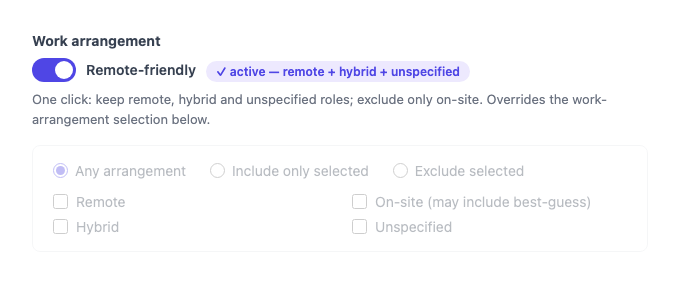
Turn it on when you want to catch every role that could plausibly be remote-friendly, including jobs that don’t explicitly state their arrangement (“Unspecified”). Roles with a clear on-site label are excluded.
When the toggle is on, it overrides the arrangement selection below.
Fine-grained selection
Turn the toggle off to choose specific arrangements yourself.
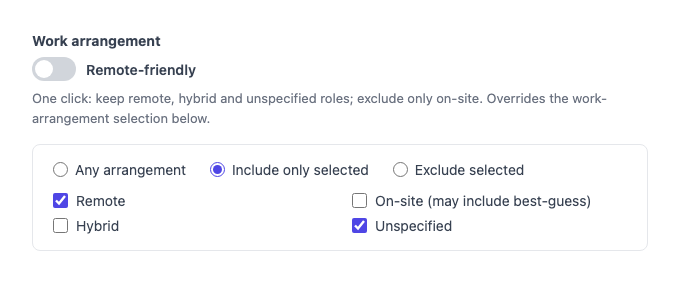
- Any arrangement — no filter, all signals pass through (default)
- Include only selected — keep signals matching the checked arrangements
- Exclude selected — remove signals matching the checked arrangements
Arrangements:
| Option | What it matches |
|---|---|
| Remote | Explicitly remote roles |
| Hybrid | Part remote, part on-site |
| On-site (may include best-guess) | Location-based signals inferred as on-site |
| Unspecified | Roles that don’t state a work arrangement |
When to include Unspecified
Many job postings don’t mention remote or on-site at all. Excluding “Unspecified” hides a large portion of signals — typically more than half. If your goal is finding remote-friendly companies (not just explicit remote roles), keep Unspecified in.
The Remote-friendly toggle handles this automatically: it pre-selects Remote, Hybrid, and Unspecified so you don’t miss anything.
Tips
- Start with the Remote-friendly toggle for the simplest setup — one click, no manual selection.
- To find only explicitly-advertised remote roles, turn the toggle off and check Remote only.
- To exclude on-site signals without locking to a specific set, use Exclude selected → On-site.
- For even more control, combine with Job description required words (e.g.
remote,home,hybrid) — this checks the actual description text rather than the structured label.